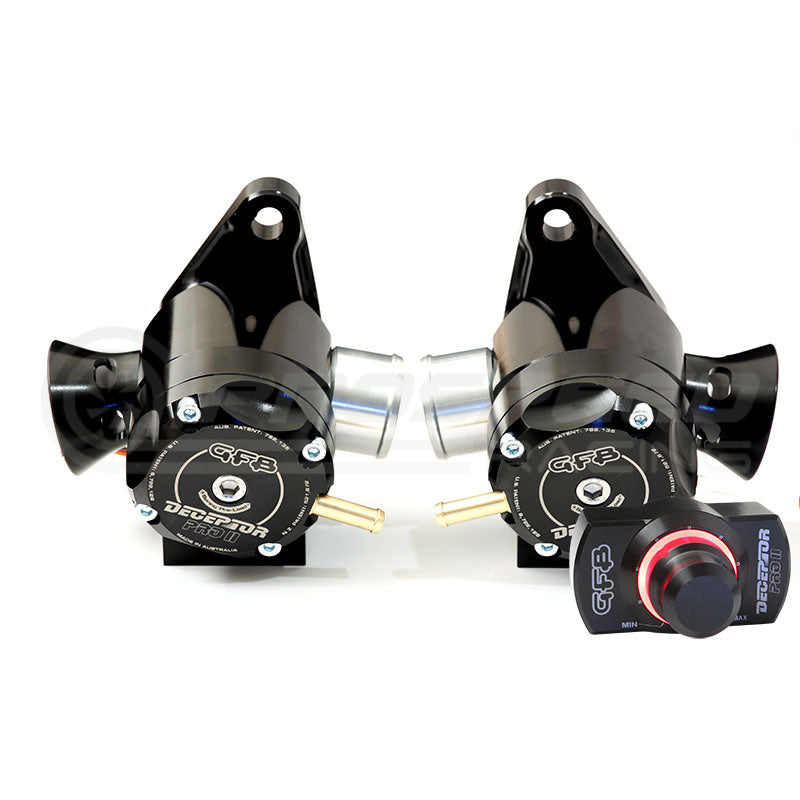
GFB Deceptor Pro II Electronic BOV Blow Off Valves
Nissan GT-R R35 (2 Valves Included)
In Stock:
This product is in stock & ready to be dispatched.
Limited Stock Available:
Stock is running low. Order soon to avoid missing out!
Almost Gone:
Stock is critically low! This product may sell out soon.
Incoming:
Product will be in stock soon.
Usually Ships In:
This product is out of stock and will usually ship in the timeframe displayed.
Sold Out:
This product is currently out of stock.
Request ETA
$859.50
RRP $955.00(Save 10%)
Unit price /
Unavailable
Bidit helps you and the merchant agree on a price. You set the price and the merchant checks if they can accept your offer. You aren't competing with anyone else.
Now you can control the sound of the BOV from inside the cabin!
So how much more can you do with a blow-off valve? Well, the Deceptor Pro II takes the ‘Respons’ concept even further…
Adjust your BOV venting bias electronically on-the-fly
Revised porting to optimise flow and venting bias
Compact design fits in most factory valve locations
Direct bolt on for many vehicles
New bore finishing process ensures a lifetime of reliable operation
Deceptor Pro II features:
Remote proportional venting bias/volume control- from silent to loud or anywhere in between
Sleek, compact in-car BOV volume controller with backlit dial
End point adjustment to control maximum vent to atmosphere bias setting
Volume adjustment mechanism driven by a high-torque geared electric motor
Durable, low-friction ger train supported by precision sealed ball-bearing
Supplied with all parts and wiring required to have it up and running quickly and easily
Vehicle Fitment:
2007+ Nissan GT-R R35
Fitment Table
<div class="dynamic-checkout__content" id="dynamic-checkout-cart" data-shopify="dynamic-checkout-cart"> <shopify-accelerated-checkout-cart wallet-configs="[{"supports_subs":true,"supports_def_opts":false,"name":"shop_pay","wallet_params":{"shopId":84839039279,"merchantName":"Pro Speed Racing","personalized":true}},{"supports_subs":false,"supports_def_opts":false,"name":"paypal","wallet_params":{"shopId":84839039279,"countryCode":"AU","merchantName":"Pro Speed Racing","phoneRequired":true,"companyRequired":false,"shippingType":"shipping","shopifyPaymentsEnabled":true,"hasManagedSellingPlanState":null,"requiresBillingAgreement":false,"merchantId":"LXXML66B2BYR4","sdkUrl":"https://www.paypal.com/sdk/js?components=buttons\u0026commit=false\u0026currency=AUD\u0026locale=en_US\u0026client-id=AexZEtAxk09Ncgj6FSWFFyGKbxxAZ_LTyJ2DPdJWl1YUlecinmc5AfIaRF2qYjWlusWahlzz6SVkY5Ci\u0026merchant-id=LXXML66B2BYR4\u0026intent=authorize"}}]" access-token="706ba983f15457e978c8a1c115b311ae" buyer-country="AU" buyer-locale="en" buyer-currency="AUD" shop-id="84839039279" cart-id="829832baa6441b1681a5d30a260bfbe4" enabled-flags="["ce346acf"]" > <div class="wallet-button-wrapper"> <ul class='wallet-cart-grid wallet-cart-grid--skeleton' role="list" data-shopify-buttoncontainer="true"> <li data-testid='grid-cell' class='wallet-cart-button-container'><div class='wallet-cart-button wallet-cart-button__skeleton' role='button' disabled aria-hidden='true'> </div></li><li data-testid='grid-cell' class='wallet-cart-button-container'><div class='wallet-cart-button wallet-cart-button__skeleton' role='button' disabled aria-hidden='true'> </div></li> </ul> </div> </shopify-accelerated-checkout-cart> <small id="shopify-buyer-consent" class="hidden" aria-hidden="true" data-consent-type="subscription"> One or more of the items in your cart is a deferred, subscription, or recurring purchase. By continuing, I agree to the <span id="shopify-subscription-policy-button">cancellation policy</span> and authorize you to charge my payment method at the prices, frequency and dates listed on this page until my order is fulfilled or I cancel, if permitted. </small> </div>
Your cart
Choose options
PayPal Pay Later Messaging
Step 1: Choose message placement
Click the button below and then hover over your page to select a placement.
Step 2: Paste and save
You have copied the placement for the Product Page.
Go back to the App Embeds section, and in the Paypal Advanced Settings, paste the copied value into the
Product Page field and click the 'Save' button in the top right corner.