
Loading...
 | SKU:
TS-0620-4012
| SKU:
TS-0620-4012
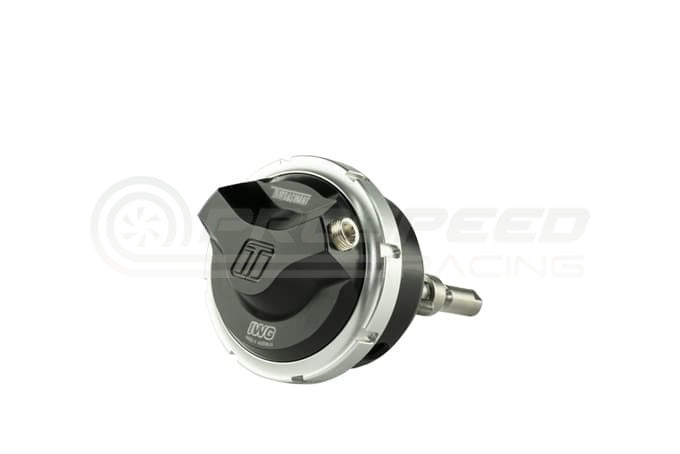
Turbosmart GenV IWG Twin Port Internal Wastegate Actuator 14psi - BorgWarner EFR Turbo
BorgWarner EFR Turbo
$365.19
Unit price
/
Unavailable

%3Cp%3EEarn%20[points_amount]%20when%20you%20buy%20this%20item.%3C/p%3E
-

FAST, TRACKED SHIPPING
Express Available
-
International Shipping
We ship Worldwide
-

AUSSIE OWNED
-

FAST DISPATCH


Description
Description
Turbosmart GenV Twin Port Internal Wastegate Actuator to suit Borg Warner EFR Series Turbochargers. This IWG actuator, has it all taking technology from the Award winning GenV range of External Wastegates providing unparalleled actuator performance.
Turbosmart GenV IWG (Internal Wastegate Actuator) Range provide improvements in boost control over your factory actuator. The large working surface area of our unique diaphragm system ensures increased boost response and control, at any performance or boost level.
Using Turbosmart’s locking collar system, you can also quickly change your base spring selection from 5, all the way up to 26psi. The Nitronic guide & Hard Chromed Intermediate Rod, mated with the swivel joint system ensure the best possible lower chamber seal for true twin port control strategies, unequalled actuation range and control.
Available in
GenV Twin Port (Standard Cap): TS-0620-4012
GenV Twin Port (Position Sensor Cap): TS-0620-4014
Features
GenV cap including 1/8NPT reference ports
True Twin Port Control for a wide boost control window
Hard chromed Intermediate rod & nitride guide for cycle tested & proven reliability
Proprietary Swivel Joint for complete linear actuation
3 Secondary rods included to ensure fitment to all B1 & B2 single & twin scroll EFR’s
This is a bolt on fitment for the Borg Warner EFR Series turbocharger including Single and Twin Scroll B1 & B2 Turbochargers. Accessories are supplied to adapt to all variants, including all spring options.
Turbosmart GenV IWG (Internal Wastegate Actuator) Range provide improvements in boost control over your factory actuator. The large working surface area of our unique diaphragm system ensures increased boost response and control, at any performance or boost level.
Using Turbosmart’s locking collar system, you can also quickly change your base spring selection from 5, all the way up to 26psi. The Nitronic guide & Hard Chromed Intermediate Rod, mated with the swivel joint system ensure the best possible lower chamber seal for true twin port control strategies, unequalled actuation range and control.
Available in
GenV Twin Port (Standard Cap): TS-0620-4012
GenV Twin Port (Position Sensor Cap): TS-0620-4014
Features
GenV cap including 1/8NPT reference ports
True Twin Port Control for a wide boost control window
Hard chromed Intermediate rod & nitride guide for cycle tested & proven reliability
Proprietary Swivel Joint for complete linear actuation
3 Secondary rods included to ensure fitment to all B1 & B2 single & twin scroll EFR’s
This is a bolt on fitment for the Borg Warner EFR Series turbocharger including Single and Twin Scroll B1 & B2 Turbochargers. Accessories are supplied to adapt to all variants, including all spring options.